
Windows Unattended Installation2.6 - Download
You'll be able to download in few seconds.
Publisher Description
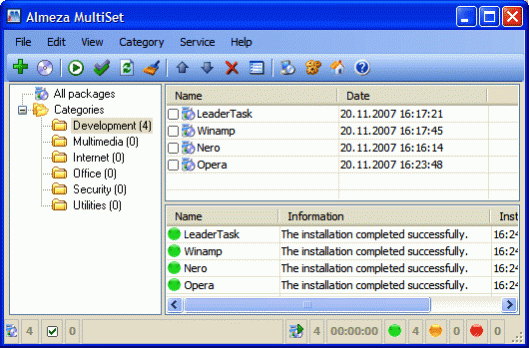
If you work as a system administrator in an organization and maintain a lot of computers, you are sure to have come across the situation when you had to buy a consignment of computers and install all kinds of software on each of them. The direct consequence of such a situation is that you have to repeat a lot of routine operations - change media in optical drives, enter registration data, follow the instructions of installation wizards.
Unattended software installation. MultiSet will automatically install all the applications you require, either onto your original computer or onto a new one. It's an ideal solution for rebuilding your systems quickly!
Create a stand-alone unattended installation CD! You can use MultiSet software to create a universal disk for automatically installing software onto a computer using any media (CD/DVD/Flash/Hard Drive).
Automation software: unattended installation. Now you can install programs in any location and as many times as you want - just insert the disk into the CDROM, DVDROM or FlashDrive, and MultiSet will perform the complete installation procedure for you!!!
One great feature in MultiSet is that it does not require any special knowledge. You do not have to know how to write any scripts. I have created several DVDs that automatically install WindowsXP together with the necessary software (MS Office, Nero, FireFox). Service packs and drivers are also installed automatically. Another key feature in the program is automatic software configuration, including WindowXP customization, i.e. you can automatically specify the necessary settings.
Tired of wasting your time on installing programs? Give MultiSet the job!
Unattended Installation of WindowsXP and Software!
About Windows Unattended Installation
This Automation Tools program is available in English, Arabic, Armenian, Bulgarian, ChineseSimplified, ChineseTraditional, Czech, Danish, Dutch, Estonian, French, Georgian, German, Greek, Hungarian, Italian, Japanese, Korean, Persian, Polish, Russian, Serbian, Slovak, Spanish, Swedish, Ukrainian. It was last updated on 29 September, 2026. Windows Unattended Installation is compatible with the following operating systems: Windows.
The company that develops Windows Unattended Installation is Unattended Installation Systems. The latest version released by its developer is 2.6.
The download we have available for Windows Unattended Installation has a file size of N/A. Just click the green Download button above to start the downloading process. The program is listed on our website since 2009-11-04 and was downloaded 0 times. We have already checked if the download link is safe, however for your own protection we recommend that you scan the downloaded software with your antivirus. Your antivirus may detect the Windows Unattended Installation as malware if the download link is broken.
How to install Windows Unattended Installation on your Windows device:
- Click on the Download button on our website. This will start the download from the website of the developer.
- Once the Windows Unattended Installation is downloaded click on it to start the setup process (assuming you are on a desktop computer).
- When the installation is finished you should be able to see and run the program.
Program Details
General
System requirements
Download information
Pricing
Version History
version 2.6
posted on 2009-11-04
* the program kernel was improved
* an error with answer file was fixed
* some bugs were fixed
* the bug causing an error while creating Windows ISO has been fixed
version 2.0
posted on 2007-05-08
Disclaimer
External Download
We do not host Windows Unattended Installation on our servers. We did not scan it for viruses, adware, spyware or other type of malware. This app is hosted by the software publisher and passed their terms and conditions to be listed there. We recommend caution when installing it.
The external download link for Windows Unattended Installation is provided to you by apps112.com without any warranties, representations or guarantees of any kind, so access it at your own risk.
If you have questions regarding this particular app contact the publisher directly. For questions about the functionalities of apps112.com contact us.
